
Every month, businesses around the world process billions of invoices. For many companies, this means hours of manual data entry, mountains of paperwork, and the constant worry about human errors creeping into their financial records. If your accounts payable team is still manually typing invoice details into spreadsheets, you're not alone—but you're definitely losing time and money.
The good news? Invoice OCR technology powered by artificial intelligence is changing the game. What once took hours now takes seconds, and what used to cost $15 per invoice can drop to just a few dollars. Let's explore how this technology works and why businesses everywhere are making the switch.
What is Invoice OCR Technology?
OCR stands for Optical Character Recognition—a technology that converts images of text into machine-readable digital data. When applied to invoices, OCR technology can "read" invoice documents (whether they're PDFs, photos, or scanned images) and automatically extract key information like vendor names, invoice numbers, dates, amounts, and line items.
Think of it as giving your computer the ability to read and understand invoices just like a human would, except it does it in seconds instead of minutes and with far fewer mistakes.
Modern invoice OCR goes beyond simple text recognition. Today's AI-powered systems can understand invoice layouts, identify relevant fields even when invoices look different from one another, and learn from each document they process. This means they get smarter over time, adapting to your specific vendors and invoice formats.
The Evolution from Manual Data Entry to AI-Powered Automation
Remember when processing invoices meant physically sorting through stacks of paper, manually typing each detail into your accounting system, and double-checking everything to catch errors? Many businesses still operate this way, and the costs add up quickly.
Manual invoice processing typically costs between $12 and $16 per invoice, with some businesses paying as much as $40 per invoice depending on complexity. When you're processing hundreds or thousands of invoices monthly, those numbers become staggering. A company handling just 500 invoices per month at $15 each spends $7,500 monthly—that's $90,000 annually on invoice processing alone.
The human element introduces another costly problem: errors. Manual data entry carries an error rate of approximately 1.6% to as high as 39% depending on document complexity and processing volume. Each mistake can cost up to $53 to fix when you factor in staff time, system corrections, and potential payment delays.
Processing times tell a similar story. Accounts payable clerks typically process about 5 invoices per hour manually, spending roughly 12 to 15 minutes on each invoice. With approval workflows, vendor communications, and error corrections added in, the timeline extends even further. Some enterprise businesses take three weeks or more just to approve a single invoice.
The shift to AI-powered automation changes everything. Automated systems can process invoices at costs as low as $2.36 to $5 per invoice—a reduction of up to 80%. Processing times drop from minutes to seconds, and error rates plummet to near-zero levels with modern AI achieving accuracy rates exceeding 98%.
How Invoice OCR Works: The Technology Behind the Magic
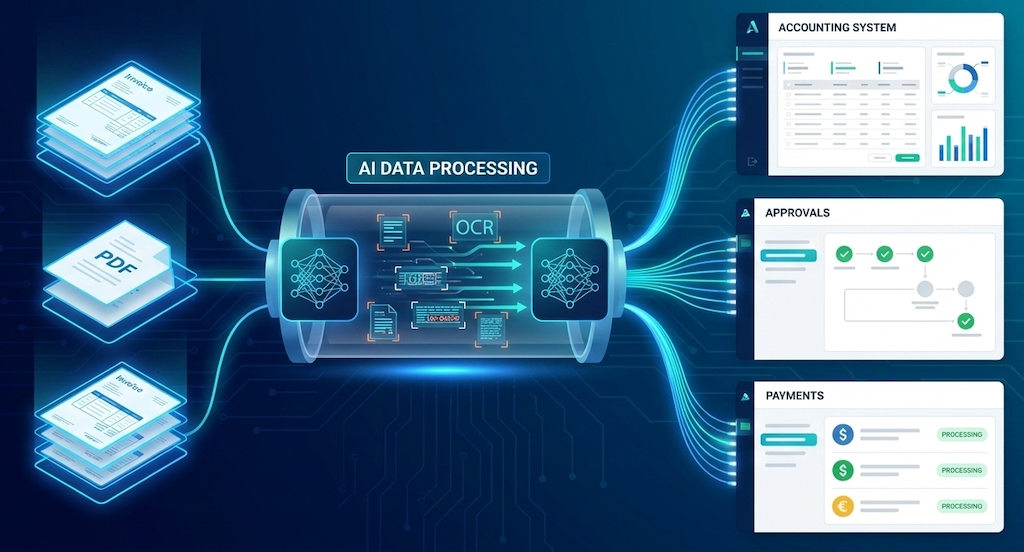
So how does invoice OCR actually work? Let's break it down into digestible steps.
Step 1: Document Capture The process begins when an invoice arrives—whether through email, cloud storage, or direct upload. Solutions like SmartBills can automatically detect new invoices from connected sources like Google Drive, Dropbox, or your email inbox, eliminating the need for manual uploads.
Step 2: Image Processing Before the OCR engine can read the invoice, it needs to be prepared. The system applies preprocessing techniques like removing noise, adjusting contrast, correcting skew (straightening tilted documents), and enhancing image quality. This ensures the best possible accuracy during text extraction.
Step 3: Text Recognition Here's where the magic happens. The OCR engine scans the invoice and converts the visual characters into digital text. Modern systems use deep learning models and neural networks that have been trained on millions of invoice images, allowing them to recognize text in various fonts, sizes, and layouts.
Step 4: Data Extraction and Classification Raw text recognition isn't enough—the system needs to understand what the text means. AI algorithms identify and classify different fields: which text represents the vendor name, which numbers are amounts versus dates versus invoice numbers. Advanced systems can handle different invoice formats automatically without requiring manual templates for each vendor.
Step 5: Validation and Verification Smart OCR systems cross-reference extracted data with your existing records, checking for duplicates, validating amounts against purchase orders, and flagging inconsistencies. This automated verification catches errors before they enter your accounting system.
Step 6: Integration and Export Finally, the clean, structured data flows directly into your accounting software, ERP system, or database. Platforms like SmartBills offer integrations with popular tools and can send data via webhooks or APIs, ensuring seamless connectivity with your existing workflow.
Key Benefits of AI-Powered Invoice OCR for Businesses
The advantages of implementing invoice OCR extend far beyond just saving time on data entry.
Dramatic Cost Reduction The numbers speak for themselves. Businesses using automated invoice processing can reduce their per-invoice costs by 70% to 80%. For a company processing 1,000 invoices monthly, switching from $15 per invoice to $3 per invoice saves $144,000 annually. That's money that can be reinvested in growth, technology, or talent.
Improved Accuracy Modern AI-powered OCR systems achieve accuracy rates of 98% to 99% on standard invoices—far exceeding human accuracy rates. This precision eliminates costly errors, duplicate payments, and the time spent on corrections. When mistakes do occur, they're typically caught by automated validation rules before causing problems.
Massive Time Savings While manual processing allows an employee to handle about 5 invoices per hour, automated systems can process 30 or more invoices per hour—often in just 1 to 2 seconds per document. This frees your finance team to focus on strategic work like cash flow analysis, vendor negotiations, and financial planning instead of repetitive data entry.
Faster Payment Cycles Automated invoice processing can reduce approval times from days or weeks to hours. This means you can take advantage of early payment discounts, improve vendor relationships with timely payments, and avoid late payment penalties that eat into your bottom line.
Better Cash Flow Management When you have real-time visibility into your invoice data and can process invoices quickly, you gain better control over cash flow. You know exactly what you owe and when, making it easier to plan payments strategically and maintain healthy working capital.
Scalability Without Added Headcount As your business grows and invoice volume increases, manual processing requires hiring more staff. With automated OCR, you can handle growing volumes without proportionally increasing costs or team size. One automated system can scale from hundreds to thousands of invoices with minimal additional investment.
Common Challenges in Manual Invoice Processing
Before making the switch to automation, it helps to understand exactly what problems you're solving.
The Paper Trail Nightmare Despite digital transformation efforts, 37% to 48% of small businesses still receive paper invoices. Physical documents need to be sorted, stored, retrieved, and eventually archived—all of which adds time, space requirements, and material costs. Paper invoices also get lost, damaged, or misfiled more easily than digital records.
Error-Prone Manual Entry On average, 57% of invoice data still requires manual entry in many businesses. Human errors are inevitable when dealing with repetitive tasks. Typos, transposed numbers, duplicate entries, and misread amounts create a cascade of problems that require time-consuming corrections.
Approval Bottlenecks Manual approval processes create significant delays. About 49% of businesses require 2 to 3 people to approve each invoice, while 22% require 6 or more approvers. Each handoff introduces potential delays, and tracking down the right approver can take days, especially if someone is out of office or on vacation.
Lack of Visibility Without a centralized digital system, it's difficult to know where invoices are in the approval process. Are they waiting for review? Have they been paid? Did they get lost somewhere? This lack of transparency leads to vendor inquiries, strained relationships, and internal confusion.
Hidden Costs of Inefficiency Beyond the direct labor costs, manual processing carries hidden expenses: storage space for paper documents, printing and mailing costs, the opportunity cost of staff time spent on repetitive tasks instead of value-adding work, and the potential impact of late payments on vendor relationships and credit terms.
Invoice OCR Accuracy: How AI Minimizes Errors
Accuracy is where AI-powered OCR truly shines compared to manual processing.
Modern OCR systems leverage multiple AI technologies to achieve exceptional accuracy. Deep learning models trained on millions of invoice examples can recognize text in countless fonts, languages, and layouts. Vision transformers and multimodal language models can understand context, helping the system distinguish between similar-looking characters (like "O" and "0") based on surrounding text.
The best systems achieve accuracy rates of 98% to 99.5% across diverse invoice formats and languages. Compare this to the 1.6% to 39% error rates in manual processing, and the improvement is dramatic.
What happens when the AI encounters uncertainty? Quality OCR solutions flag low-confidence fields for human review rather than guessing. This creates a hybrid workflow where humans only need to verify uncertain items, combining AI efficiency with human judgment where it matters most.
SmartBills, for example, uses advanced AI to handle various invoice formats automatically while maintaining high accuracy. The system learns from your specific invoices over time, continuously improving its performance for your unique vendors and document types.
Integration Capabilities: Connecting OCR with Your Existing Systems
A powerful invoice OCR solution is only valuable if it works seamlessly with your existing tech stack.
Modern OCR platforms offer multiple integration options to fit different workflows. Cloud storage integrations with Google Drive, Dropbox, Box, and OneDrive allow the system to automatically detect and process new invoices as they arrive. Email integrations can monitor specific inboxes and extract invoices from incoming messages.
For accounting software connectivity, look for platforms that integrate with your existing tools—whether that's QuickBooks, Xero, SAP, or other systems. Direct integrations eliminate the need for manual data transfer and ensure information flows automatically into the right place.
API access and webhooks provide even more flexibility. With APIs, you can programmatically access invoice data and build custom workflows. Webhooks send real-time notifications when events occur (like invoice processing completion), allowing you to trigger actions in other systems instantly.
Automation platform integrations with tools like Zapier, Make, and n8n let non-technical users build custom workflows without coding. Want to automatically send Slack notifications when high-value invoices arrive? Or create tasks in project management tools when specific vendors submit invoices? These automation platforms make it simple.
SmartBills offers all these integration capabilities, allowing businesses to create workflows that match their exact needs without forcing them to change how they work.
Real-World Use Cases: Industries Transforming with Invoice OCR
Invoice OCR technology benefits virtually any business that processes invoices, but certain industries see particularly dramatic transformations.
Retail and E-Commerce Retail businesses often deal with high invoice volumes from multiple suppliers. Automated OCR helps them process inventory invoices quickly, match them against purchase orders, and maintain accurate inventory records. This speed is crucial for businesses with fast-moving stock.
Professional Services Consulting firms, law firms, and agencies process vendor invoices, client reimbursements, and subcontractor invoices. OCR automation ensures accurate client billing, simplifies expense tracking, and reduces the administrative burden on billable staff who should be focusing on client work.
Healthcare Medical practices and healthcare facilities receive invoices from pharmaceutical suppliers, equipment vendors, and service providers. Accurate invoice processing is critical for compliance and cost management. OCR helps healthcare organizations maintain detailed audit trails while freeing administrative staff for patient-focused tasks.
Manufacturing Manufacturers juggle invoices from raw material suppliers, equipment maintenance providers, and logistics companies. With complex supply chains and high volumes, automated invoice processing provides the visibility and speed needed to maintain smooth operations and manage just-in-time inventory.
Real Estate and Property Management Property managers process invoices from maintenance contractors, utility companies, and service providers across multiple properties. OCR automation helps allocate expenses correctly to specific properties and owners, simplifying reporting and improving accuracy.
The Future of Invoice OCR: Emerging Trends and AI Advancements
The evolution of invoice OCR isn't slowing down—if anything, it's accelerating.
Multimodal AI and Vision Language Models The newest generation of AI models can process and understand both text and images simultaneously, bringing human-like comprehension to invoice processing. These systems don't just read invoices; they truly understand them in context, making them more adaptable to unusual formats and better at handling exceptions.
Self-Learning and Continuous Improvement Future OCR systems will require minimal setup and training. They'll learn automatically from each invoice processed, adapting to new vendors and formats without manual intervention. This self-supervised learning approach reduces maintenance overhead and ensures the system gets smarter over time.
Enhanced Fraud Detection AI-powered OCR will increasingly include sophisticated fraud detection capabilities, identifying duplicate invoices, suspicious amounts, unauthorized vendors, and anomalous patterns that might indicate fraud or errors. This proactive protection adds another layer of financial security.
Real-Time Processing and Predictions Future systems won't just process invoices—they'll predict cash flow needs, suggest optimal payment timing, and provide actionable insights. Imagine your invoice system recommending which invoices to pay early for discounts and which to delay to optimize working capital, all based on AI-driven analysis.
Expanded Language and Format Support As global business continues to grow, OCR systems will support even more languages and handle increasingly diverse invoice formats from around the world. This will be particularly valuable for businesses with international supplier networks.
Blockchain Integration Some forward-thinking companies are exploring blockchain integration for invoice processing, creating immutable audit trails and enabling smart contracts that automatically process and pay invoices when predetermined conditions are met.
Conclusion: Making the Switch to Automated Invoice Processing
The case for invoice OCR technology is compelling. With processing costs dropping by 70% to 80%, accuracy rates exceeding 98%, and time savings that free your team for strategic work, the benefits are clear and measurable.
Manual invoice processing isn't just inefficient—it's expensive, error-prone, and unsustainable as your business grows. Every hour your team spends on manual data entry is time they can't spend on analysis, planning, and activities that drive real business value.
The good news is that implementing invoice OCR doesn't require a massive overhaul of your systems or processes. Modern solutions like SmartBills are designed to integrate seamlessly with your existing workflows and tools. You can start small, see immediate benefits, and scale up as you gain confidence.
The technology is mature, proven, and accessible to businesses of all sizes. Whether you're processing 100 invoices per month or 10,000, there's a solution that fits your needs and budget.
The question isn't whether to automate your invoice processing—it's how soon you can start. Every day you wait is another day of unnecessary costs, preventable errors, and wasted time.
Ready to transform your invoice processing? SmartBills offers AI-powered invoice extraction and automation that integrates with your existing tools and workflows. Start with a free trial and experience firsthand how automated invoice processing can save your business time and money.
Start Your Free Trial and process your first 25 invoices to see the difference invoice OCR can make for your business.